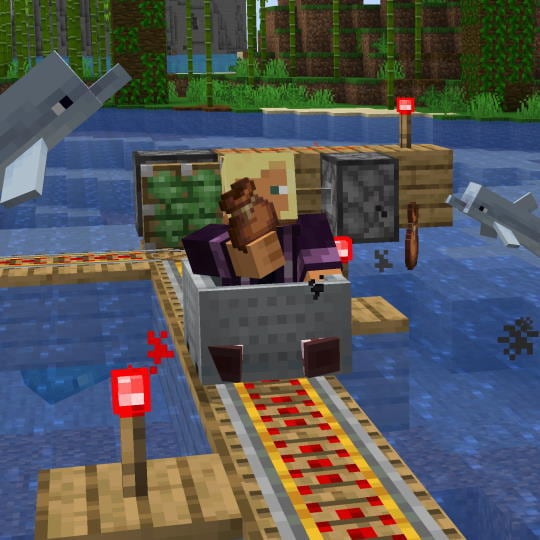
Minecraft 24w33a
We know you have been waiting long for the next update, and we are finally kicking off the new snapshot cycle with Snapshot 24w33a!
Over the summer someone changed our password and wouldn't let us know what it was until we finished 200 bug fixes (the password was cubepork14 by the way). This update also features a Bundle of new Experiments that we are eager for you to try out!
Enable the new experimental features in the Experiments menu when creating a new world and let us know what you think!
Read below for a full list of the changes included.
Your thoughts on the game continue to shape new updates so please upvote and report any new bugs at bugs.mojang.com and leave us your feedback at feedback.minecraft.net.
Experimental Features#
The following changes only apply when their respective Experiment is turned on, either by activating the corresponding experimental data pack or by turning it on in the Experiments screen while creating the world.
These experiments have no effect unless enabled. You can find more information about Feature Toggles here.
Bundles#
Bundles are back The Bundle was added to Java Edition as an experiment in 2020. We are now working on Bundles again! To test Bundles you must create a new world with the Bundles experiment turned on. (When creating a new world click ‘More’, then ‘Experiments’, then click the button next to the word ‘Bundles’.) A Bundle is an item that lets you stack different blocks or items together in the same inventory slot. Different items normally don’t stack together, so you can end up wasting space by only having a few items in each slot. A Bundle lets you pack those items together so there is no wasted space.
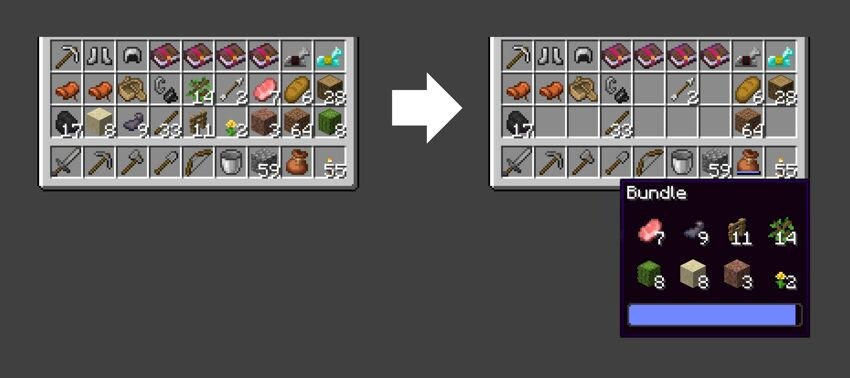
The Bundle has a tooltip that shows some of the items inside. If the Bundle has up to 8 item types, you will see all of them and can pull any item out immediately. If there are more than 8 item types then some rows of items will be hidden. You may want to craft a new Bundle to keep everything easy to reach. A Bundle can be crafted with 1 String and 1 Leather. Please try out this all-new version of the Bundle and let us know what you think!
- A Bundle only fits one stack (usually 64 items) but it can be a mixture of many different item types
- You can insert items into a Bundle directly in the inventory
- Bundles have a tooltip that shows the items inside
- If a Bundle has less than 8 item types inside, the tooltip will show all of them
- Otherwise the tooltip will show the top two rows of items and the others will be hidden below
- You can select any of the visible items to pull out of the Bundle
- Right-click to take the first item
- Use the number keys or scroll wheel to select a different item, then right-click to take it
Developer's Note: In the original Bundle experiment you could only pick the top item. We got a lot of feedback that players wanted more flexibility when taking items out. To address this we put a submenu inside the Bundle, which has never been done before in Minecraft!
- When selecting an item to remove, the Bundle icon shows that item poking out of the Bundle
- When holding a Bundle in hand, you can empty it onto the ground by right-clicking
- The Bundle is crafted with one String above one Leather
Developer's Note: The original prototype for Bundles was much more expensive to craft and used Rabbit Hide which is only available in certain biomes, so the player had to explore to get their first Bundle. In this version we’ve made it cheaper and something that you can craft at home in almost any biome. We want it to be easy to get Bundles in a new world so you can use it in your early adventures.
- The controls have changed from the original prototype:
- Use left-click to put an item into a Bundle
- Use right-click to remove the top item type from a Bundle
- When the Bundle tooltip is visible, use number keys or the mouse wheel to select a different item type then use right-click to remove it
Redstone Experiments#
Added a new Experiment containing various Redstone-related changes. This can be enabled by selecting "Redstone Experiments" in the Experiments menu when creating a world.
Please note that the experimental features behind this toggle are not aimed at any future release at this time. Instead, this is a place for us to try out changes and gather feedback.
We are excited to hear what you think about these changes: please share your feedback on the feedpack page.
Redstone Wire#
- The performance impact of Redstone wire (connected blocks of Redstone Dust) has been improved
- Redstone wire now only triggers block updates on blocks that may receive power from the wire
- Before a line of wire causes block updates, the new signal strength of all connected wires is set
- The update order around Redstone wire has been changed
- The aim is to make wire work the same, independent of position and orientation
- When possible the order is deterministic based on the context the updates are caused in
- When there is not enough context to fully determine the order, the rest is picked at random
Developer's note: We know that randomness in Redstone is usually unwanted.
We've used it here because we've made things deterministic whenever it makes sense, and sometimes it just doesn't make sense - and we don't want some hidden state (like location-based hashes!) determining the order and making machines work differently at different coordinates or in different orientations.
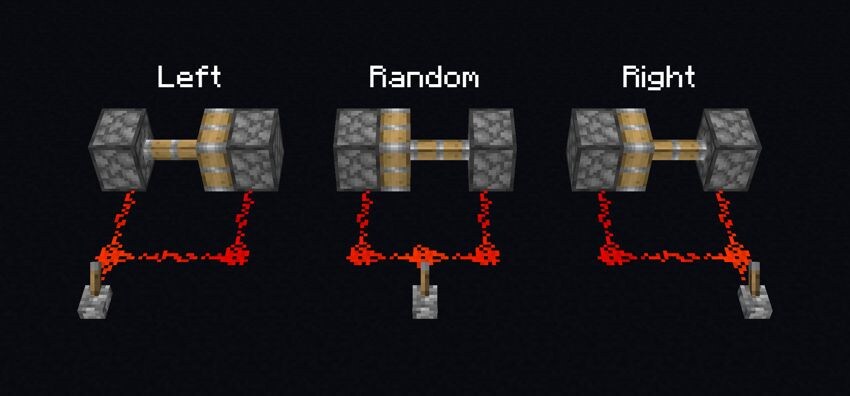
The screenshot below shows an example of a 'random' vs 'non-random' wire - we think it's actually pretty logical, and is within the players control to build machines that behave deterministically.
But we are looking forward to hearing what you think after trying it out!
Order in Which a Line of Wire Changes#
- When a line of wire turns on, the wires closer to the power source will cause block updates first
- When a line of wire turns off, the wires closer to where the power source was, will cause block updates first
- When two wires have the same distance to the power source, which of them causes updates first is picked at random
- The random choice is made once for the entire line of wire, to limit the amount of possible outcomes
- This means, when powering a line of wire from the side, it randomly chooses one of two possible update orders
- The advantage of having few possible update orders is that the results are more predictable
Block Updates Around a Wire#
- The order in which blocks around the wire update is based on the direction the wire received an update from
- Currently, the order is: back, front, left, right, down, up
- left and right may be swapped, depending on the random choice made by the line of wire
- When the updates are further distributed through solid blocks, the same order is applied there
Known Issues#
As this experiment only changes Redstone wire, interactions with other components may not always act as expected, especially when it comes to update orders.
Minecart Improvements#
Added a new Experiment containing various movement changes to Minecarts. This can be enabled by selecting "Minecart Improvements" in the Experiments menu when creating a world.
Our long term goal is to make vehicle travel, like minecarts, a viable option for players compared to other late-game options which currently dominate most playstyles. To achieve this, we aim to make riding minecarts a smooth experience, with consistent and predictable motion and rotation. With this feature toggle we are laying a foundation to build upon in the future. We are aware of that these changes will break some existing contraptions, which is why we want to collaborate with the community to shape the upgrade and future experience of riding minecarts.
Please note that the experimental features behind this toggle are not aimed at any future release at this time. Instead, this is a place for us to try out changes and gather feedback.
We are excited to hear what you think about these changes: please share your feedback on this feedback page.
Movement Changes#
- Minecarts will articulate their movement better when going fast, riding on the rail all the time
- Minecarts will now smoothly turn along with the track and are less likely to halt or derail
- Minecarts can now jump better
- They keep their vertical momentum when the track ends with a slope
- Minecarts will tilt to visually articulate while in the air
- No rail grinding sound is played when Minecarts are flying through the air
- Added a new accessibility setting that makes players follow the rotation of Minecarts they ride
- Defaults to off
- Only has effect when within a world with the experiment enabled
- Added new gamerule
minecartMaxSpeedthat changes the maximum speed of Minecarts- Defaults to 8 and goes up to 1000 blocks per second.
- Setting it to a specific value does not guarantee that a minecart will reach that particular max speed - there are built in air resistances and similar effects that the speed added through slopes or powered rails need to overcome
- This gamerule only exists in worlds with the experiment enabled
Minecart Changes#
- Minecarts can no longer be placed within another Minecart by the player or a dispenser
- Minecarts can now consistently be placed next to each other along a track
- Minecarts now pick up mobs more consistently when moving along a track
Known Impact#
- We are aware that these changes will make certain contraptions such as 'piston bolts' not work at all, or have their behavior changed
- Very delicate rail networks will have their timings changed due to slight changes in speeds, movement distance, friction etc.
- Contraptions that rely on Minecarts snapping to rails will no longer work, or have their behavior changed
Changes#
- Various items and blocks have had their assigned rarities changed
- Tweaked portal cooldowns of vehicles and projectiles
- After using a Nether Portal, Minecarts and Boats now only need to leave the portal for 0.5 seconds to use a portal again (down from previous 15 seconds)
- After using a Nether Portal, projectiles such as Enderpearls and Arrows now only need to leave the portal for 2 ticks to use a portal again (down from previous 15 seconds)
- Suspicious Stew recipes are now shown in the recipe book
- Breeze no longer have a minimum distance required to attack a target
- Added a new death message for when killed by a Mace smash attack
- Wolves can now also be fed cod, cooked cod, salmon, cooked salmon, tropical fish, pufferfish and rabbit stew to achieve parity with Bedrock
- Enchanted shields now have the same reduced glint as enchanted armor
- Banner Pattern items have new names and icons
- Smithing Template items are now named after their template type instead of the generic "Smithing Template" name
- They instead specify that they are a Smithing Template through a subtitle in the hover text
- The game will now limit the maximum framerate when it is minimized or when the player is AFK
- A new Video Setting is introduced to configure this behavior
- Added language support for Tzotzil and Belarusian (Latin)
- Tweaked Bee flight distances and cooldowns
- Bees now wander around randomly for less time after exiting a nest/hive
- If a bee has a known nest/hive, it will travel less far from it, thus being less likely to get lost
- Significantly increased the amount of time a Bee can take to return to a known nest/hive before it gives up trying to return home
- Bees are now a lot less likely to get stuck on corners or when they are close to a nest/hive they are trying to return to
- Bees are also now a lot less likely to try and pathfind to a flower it cannot reach
- Updated the Bundle
- Bats can now spawn at any height, not just below sea level, as long as it is dark enough and there is a solid block to spawn on
- A triggered raid will no longer start if the raiders cannot find a place to spawn within a reasonable distance of the village they are trying to raid
- Added baby versions of Dolphins, Squids, and Glow Squids
- Added small and large Salmon variants
- The title specified in the
written_book_contentcomponent will now be prioritized overcustom_nameanditem_namefor any item with a non-empty title in this component - The performance of the server (tick rate) has been improved when using higher render distances
- Furthermore, the impact of loading and generating chunks on tick rate has been reduced
- Redstone Torches have been given a new look with updated textures and models, to give it a unique and distinctive identity
Banner Patterns#
- Each Banner Pattern item now includes their pattern type in their name instead of as a subtitle
- Unique item textures have been added to better distinguish each pattern type
- The following Banner Patterns have been added to achieve parity with Bedrock:
- Field Masoned
- Crafted with Paper and Bricks
- Bordure Indented
- Crafted with Paper and Vines
- Field Masoned
- The Bricks and Curved Border patterns in the Loom can no longer be accessed without the above Banner Patterns
Rarity#
- Rarity is a set of categories which determine the color used to display the name of an item or block
- It has no gameplay impact, but is used to signal how difficult something is to obtain
- By default, unless specified otherwise, all items and blocks have a rarity of Common which displays their name in the color white
- We have re-evaluated the rarity of all items and blocks in the game to more accurately reflect the current challenge of obtaining them, given the following guidelines:
- Items and blocks become more rare depending on the following factors:
- The chance of finding it in a loot table, including mob drops
- The amount of travelling required to obtain it
- The difficulty of any obstacle which must be overcome to obtain it
- The possible amount of that item or block which exists in the world
- Any item or block which can be crafted must inherit the highest rarity of its crafting ingredients
- For example, a Mace has an Epic rarity because one of its ingredients (the Heavy Core) has an Epic rarity
- Likewise, any crafted item which has only Common crafting ingredients must also be Common
- Items and blocks become more rare depending on the following factors:
- The lists below detail the items and blocks which have changed to that rarity category
Common#
- End Crystal
- Golden Apple
Uncommon#
- Sniffer Egg
- Chainmail Helmet
- Chainmail Chestplate
- Chainmail Leggings
- Chainmail Boots
- Recovery Compass
- Disc Fragment 5
- Nautilus Shell
- Echo Shard
- Goat Horns
- Pottery Sherds
- Ominous Bottles
- Ominous Banner
- Netherite Upgade
- Sentry Armor Trim
- Dune Armor Trim
- Coast Armor Trim
- Wild Armor Trim
- Tide Armor Trim
- Snout Armor Trim
- Rib Armor Trim
- Wayfinder Armor Trim
- Shaper Armor Trim
- Raiser Armor Trim
- Host Armor Trim
- Flow Armor Trim
- Bolt Armor Trim
- The following Music Discs:
- 13
- Cat
- Blocks
- Chirp
- Creator (Music Box)
- Far
- Mall
- Mellohi
- Stal
- Strad
- Ward
- 11
- Wait
- Relic
- 5
- Precipice
Rare#
- Enchanted Golden Apple
- Enchanted Golden Apples have become more common in recent years due to being accessible in both Ancient Cities and Trial Chambers, warranting a demotion to Rare instead of Epic
- Trident
- We recently increased Trident's rarity up to Epic from Common, but after re-evaluating we felt that it was easier to obtain than other items in the Epic category such as Heavy Cores or Elytras
- Nether Star
- Ward Armor Trim
- Eye Armor Trim
- Vex Armor Trim
- Spire Armor Trim
- Wither Skeleton Skull
- Skull Charge Banner Pattern
- Now that Wither Skeleton Skulls are Rare, these banner patterns should be Rare as well
- Thing Banner Pattern
- Now that Enchanted Golden Apples are Rare, these banner patterns should be Rare as well
- The following Music Discs:
- Pigstep
- otherside
- Creator
Epic#
- Elytra
- Dragon Head
- Silence Armor Trim
Inactivity FPS limit#
- The game will now limit the maximum framerate in certain situations
- These situations are controlled by a new Video Setting:
Reduce FPS when - Possible options are:
Mimimized- Limits framerate to 10 FPS only when the game window is minimized
AFK- Limits framerate to 30 FPS when the game is not getting any player input for more than a minute
- Further limits to 10 FPS after 9 more minutes of no input
- Also limits to 10 FPS when the game window is minimized
- The default is
AFK
Player Safety#
Skin Reporting#
- Added reporting reason "Sexually inappropriate"
- This is intended for skins that are graphic in nature relating to sexual acts, sexual organs, and sexual violence
- Removed reason "Defamation" due to lack of relevance for skins
- Removed reason "Threat of harm to others" due to already being covered by "Harassment or bullying" reporting reason
Name Reporting#
- Added a text label above the description box to clarify that only the name of the player is subject to the report
Realms#
- Extended the
text-filtering-configin order to support an internal migration for Realms Profanity Filtering- Servers currently utilizing the
text-filtering-configwill be able to continue to do so without any changes
- Servers currently utilizing the
Trial Chambers#
- Added new variations to the hallways, including "Encounters": Short challenges leading to a larger chamber.
- Beds in intersections now have their colors randomized.
- Replaced the empty chests at the entrance of chamber with a Hopper and Barrel to better show the players that these are meant for disposal and inventory managment!
Technical Changes#
- The Data Pack version is now 49
- Resource Pack version is now 35
- Added some information about data pack structure (for example, data-driven registries) to generated reports
- Added unique block sounds to the Monster Spawner block
- New
server.propertiesoption:pause-when-empty-seconds(default60)- When set to a positive value, causes the server to pause when no player has been online for that many seconds
- Removed
server.propertiesoptions:spawn-animalsandspawn-npcs
Network Protocol#
- Added
minecraft:client_tick_endserverbound packet during play phase, sent when the client finishes processing its current tick- This is unused by the Vanilla server, but left for use by custom server implementations
- Added ability for custom servers to override the order that players appear in the 'tab list'
- This is controlled by a non-negative ordering index that is sorted highest to lowest
- The client now shares the state of the 'Particles' limiter option to be used by custom servers
Data Pack Version 49#
- Goat Horn instruments are now data-driven
- Sheep shearing is now controlled by loot tables found as
shearing/sheep/<color> - Mooshroom shearing is now controlled by loot tables found as
shearing/mooshroom/<variant> - Snow golem shearing is now controlled by a loot table found as
shearing/snow_golem - The
crafting_special_suspiciousstewrecipe type has been removed - Added new fields to painting variant definitions
- Added optional field
explosion_powertotntandtnt_minecarttypes- Defaults to 4
- For TNT minecarts, field value is added to speed-based explosion power
- Added support for Enchantment trigger
projectile_spawnedin the following items:- Snowballs
- Tridents
- Small Fireballs
- Thrown Potions
- Ender Pearls
- Fishing Rod
- Firework Rocket
- Wind Charge
- Eggs
- Added new item components
- Attribute IDs no longer have
generic.,player.andzombie.prefixes - Recipe ingredient format has been simplified
- Invalid
selectorpatterns in Chat Components will now cause commands to fail to parse, instead of resolving to an empty string - Added
tempt_rangeattribute - can be used to change the range, in blocks, at which temptable mobs can be tempted
Instruments#
Goat Horn instruments are now defined in a data pack registry folder called instruments. Like other registries, changing this content in data packs is considered experimental and requires a full world re-load to take effect.
Fields:
sound_event: The sound event the instrument playsrange: The maximum range (in blocks) at which the sound can be hearduse_duration: The amount of time (in seconds) the instrument is considered in use after triggering, which also serves as its cooldowndescription: A Text Component used as the descrpition of the instrument in item tooltips
Painting variant#
- Added new optional fields
authorandtitle, holding text components to be displayed in the creative menu tooltip - This replaces previous mechanism where those values were derived from variant name
- Author tooltip has been removed for
earth,wind,fire,waterandwithervariants
Tags#
Item Tags#
furnace_minecart_fuel: Items that can be used to refuel furnace minecartvillager_picks_up: Items that a Villager will try to pick up from the ground- Added new tags to control which items can be used to craft and repair various tool sets:
wooden_tool_materialsiron_tool_materialsgold_tool_materialsdiamond_tool_materialsnetherite_tool_materials
New Item Components#
minecraft:repairable#
- If present, and this item is damageable, this item can be repaired in an Anvil using the specified ingredient
- Format: object with fields
items: Item, list of Items, or hash-prefixed Item Tag matching what can be used to repair this item- e.g.
repairable={items:'stick'}
minecraft:enchantable#
- If present (and any enchantments are applicable), this item can be enchanted in an Enchanting Table
- Format: object with fields
value: Positive integer, a higher value allows enchantments with a higher cost to be picked- e.g.
enchantable={value:15}
Recipes#
The format used for recipe ingredients has been simplified and aligned with other fields that accept item lists (like item predicates):
- For items:
{ "item": "<item id>" }now becomes"<item id>" - For tags:
{ "tag": "<tag id>" }now becomes"#<tag id>" - Lists of items are still allowed, but tags can no longer appear in such list
- Remaining restrictions:
minecraft:aircan't appear anywhere in ingredient- ingredient must have at least one tag or item
- Fields
template,baseandadditioninsmithing_transformandsmithing_trimrecipes are now optional instead of accepting empty list
Resource Pack Version 35#
- Added break, fall, hit, place, and step sounds for the Spawner block
- Removals and renames of some translations is now automatically applied at startup
- Updated the format of post-processing effect definitions
- Added support for emissive layers for block models
- The texture map for the Arrow and Bee Stinger models have been updated
- The model and UV mapping of the Dragon Egg have been updated
- Updated textures, models and sounds for the Bundle item
- Bundle icon has new models and textures
- The Bundle UI has new textures and scaling
- Added a new sound for when failing to add an item to a Bundle
- The models and UV mapping related to the Torch and blocks containing Redstone Torch have been updated
- Added new models for the Redstone Torch and updated its texture
Shaders & Post-process Effects#
- The format of post-processing effect configurations have been updated
- The
ChunkOffsetuniform in terrain shaders has been renamed toModelOffset
Post-process Effect Definitions#
intargetandauxtargetshave been merged into a singleinputslist, as specified by the input format belowouttargethas been renamed tooutputwith the same formattargetsis now a map between target name and target definition, as opposed to a list- Inline target names are replaced with an empty object
- For example,
["swap"]becomes{"swap": {}}
- For example,
- Target definitions with a specific size remain the same, with the
namefield moved into the map key- For example,
[{"name": "potato", "width": 16, "height": 16}]becomes{"potato": {"width": 16, "height": 16}}
- For example,
- Inline target names are replaced with an empty object
Input Format#
For both render target and texture inputs, the following fields may be specified:
sampler_name: string - prefix to set up both_Samplerand_Sizeuniforms- For example,
"sampler_name": "Diffuse"will link to theDiffuseSamplerandDiffuseSizeuniforms - This was previously always
DiffuseSamplerandInSizeforintarget - For
auxtargets, thenamedefined the sampler uniform, and the size was given asAuxSize<index>
- For example,
bilinear: boolean (default:false) - if true, the input will be sampled with a bilinear filter- This formerly only existed on texture inputs, however now functions for render targets
- For render targets, replaces the now removed
use_linear_filterfield on the pass definition
For inputs from a render target, the following fields may be specified:
target: namespaced id - the render target id- Either a custom target id defined in the same file, or
minecraft:mainto reference the main screen target - This replaces the former
idfield, which was a free-form string
- Either a custom target id defined in the same file, or
use_depth_buffer: boolean (default:false) - true to sample from the depth texture, false to sample from the color texture- This replaces the former
:depthsuffix applied to the target id
- This replaces the former
For inputs from a static texture, the following fields may be specified:
location: namespaced string - the location to a static texture file that can be sampled by the effect- As the
idfield did before, this resolves to a texture atassets/<namespace>/textures/effect/<path>.png
- As the
width: positive integer - width in pixels of the textureheight: positive integer - height in pixels of the texture
External Targets#
- The 'Fabulous' graphics transparency post-processing config no longer specifies the sorted framebuffers as custom targets
- These are instead imported in the same way as the
minecraft:maintarget translucent,itemEntity,particles,weather,cloudsare nowminecraft:translucent,minecraft:item_entity,minecraft:particles,minecraft:weather, andminecraft:cloudsrespectively
- These are instead imported in the same way as the
- The entity outline processing shader similarly imports the
minecraft:entity_outlinetarget
Translation removals and renames#
- During load some deprecated translation strings will now be removed and/or renamed
- Packs that used those translations will need to re-add them manually
- The full list is available in
/assets/minecraft/lang/deprecated.jsonfile inside the game's JAR file
Emissive layers for block models#
- Added an optional
light_emissionfield to block model elements - Integer value between 0 and 15, with 0 being the default value (no light emission)
- If specified and non-zero, this will behave as the minimum light level that the element can receive
Fixed bugs in Snapshot 24w33a#
- MC-379 spawn-animals and spawn-npcs=false removes all villagers and prevents summoning new mobs
- MC-1673 Several mobs can pop off paintings, item frames and leads and destroy minecarts, armor stands and anything in item form even when mobGriefing is turned off
- MC-3266 Your experience level overflows once it exceeds the integer limit
- MC-3697 TNT submerged in water can destroy item frames, paintings, armor stands, and other similar entities
- MC-4665 Anvil consuming 2 unbroken items of the same kind when renaming them
- MC-14800 When zombie villagers, husks, drowned or zombified piglins are damaged, they spawn regular zombie reinforcements
- MC-49628 When in spectator mode the head overlay shows even if it is set not to show in the skin customisation options
- MC-53602 Projectiles don't collide with the world border
- MC-55863 It rains over unloaded chunks, ignoring the biome
- MC-59471 String can be duplicated using tripwire hooks
- MC-72494 In Statistics screen 'm' is the same unit for both minutes and meters
- MC-75494 Lead item drop is not affected by doEntityDrops gamerule
- MC-86252 Shields can continue to block after entity changes dimensions due to client and server desync
- MC-89883 Squid and glow squid collision error and rubberbanding
- MC-92875 Collisionless blocks ignore entities with high velocity
- MC-101376 Elytra appearance doesn't update in 1st person mode; only in 3rd person
- MC-112257 Some NBT tags require the correct suffix
- MC-120417 Incorrect dragon egg block model
- MC-121013 "Followrange" Attribute only targets mobs on (roughly) the same y level.
- MC-125642 Bone meal is consumed when used on fern, grass and seagrass even if it cannot grow
- MC-127995 You can use bone meal on sea pickles in situations where no sea pickles will grow
- MC-129826 ["shade": false] is missing from potted cross models, resulting in most potted plants appearing darker than they should
- MC-130097 Tropical fish fin UV mapping wrong
- MC-132804 Low follow range attribute also affects mobs' idle wandering range
- MC-133862 Optimize world screen backup button has inaccurate text
- MC-135971 Can't use CTRL+Q in crafting table
- MC-137053 You cannot set the "CanBreakDoors" NBT tag of drowned to "1b"
- MC-144761 Animated texture interpolation ignores alpha channel during transition from/to transparent pixels
- MC-145656 Attribute "follow_range" is not working for hostile mobs before they find the target
- MC-151828 Woodland mansion structure '1x1_b3' has dark oak leaf block with persistent tag set to 'false'
- MC-156579 Creative players can fly through portals when going quickly enough using elytra or Riptide trident
- MC-161913 Misalignment on edges/corners of clouds
- MC-162713 Clouds are generated with offset to east and south
- MC-165182 Inventory/GUI textures no longer handle translucent pixels correctly
- MC-166880 Pufferfish spikes model seems to be broken
- MC-174732 Semi-transparent status effect textures do not render correctly in the inventory or beacon UI
- MC-179629 Faces in between cloud "blocks" can still render from outside of the cloud
- MC-180272 en_us.json contains unused strings
- MC-182478 Mob armor generates starting with boots rather than helmet
- MC-182877 Piglins use one hand to hold a loaded crossbow
- MC-183518 High CPU usage on hypervisor host possibly due to excessive syscall usage by Minecraft Server
- MC-183636 follow_range attribute not working for piglins
- MC-187920 Bees sometimes give up when returning home
- MC-188217 Bees circle above flower that is covered by all sides
- MC-190163 Zoglin spawn eggs don't occasionally spawn baby zoglins on their own accord
- MC-190484 Sneaking players' name tags are partly invisible depending on what angle you're facing
- MC-195754 Illagers in raids continuously try and fail to pick up ominous banners if they can't reach them
- MC-196556 When projectiles (such as arrows and tridents) move too fast, they can't be teleported by portals and end gateways
- MC-203748 Filled lava cauldrons are able to be put under water
- MC-209947 minecraft:block/scaffolding_unstable has incorrect cullfaces
- MC-215332 Glow squids lack a baby variant
- MC-215752 Z-fighting with paintings and item frames in solid blocks
- MC-224035 Small Dripleaf's model is inconsistent
- MC-224454 Entities don't recognize azaleas or flowering azaleas as obstacles when pathfinding
- MC-225270 Goats can move armor stands even with mobGriefing turned off
- MC-226038 Scheduled functions are part of weather in profile results
- MC-226687 Sea Level is assumed to be Y = 63 in numerous parts of Minecraft
- MC-227139 Sky fog stutters
- MC-234318 Small dripleaf stems intersect its leaves
- MC-239581 Bees do not become angry at the closest player when hive is exploded
- MC-240948 Filled powder snow cauldrons are able to be put under water
- MC-241873 Ravagers can move armor stands even with mobGriefing turned off
- MC-243413 Some Explorer Maps are missing their icon
- MC-244720 "Erased cached data" button in Optimize World is not labeled in the right order when using Tab
- MC-245510 Piglin Brute's generic.follow_range attribute functions oddly
- MC-247238 Sky fog is not cylindrical
- MC-249067 Ominous banners lose their rarity color when renamed using anvils
- MC-249901 Frogs don't play the frog eating sound when given a slime ball
- MC-256422 Some words within some strings use right single quotation marks instead of apostrophes
- MC-257309 Monster spawner tries to spawn wardens and zoglins when the difficulty is Peaceful
- MC-259687 "Distance by Elytra" statistic is approximately doubled
- MC-259798 Block hitboxes cause semi-transparent blocks not to render behind them in lower than "Fabulous" graphics settings
- MC-260013 Baby Llama's head has incorrect scale method
- MC-260858 The word "ticks" within a "/schedule" command feedback message is always pluralized
- MC-260859 Some words within a tick profiling feedback message are always pluralized
- MC-260860 Some words within some chat delay strings are always pluralized
- MC-260913 The word "blocks" within some "/spreadplayers" command feedback messages is always pluralized
- MC-260914 "/spreadplayers" strings for entities consist of inconsistent noun usage
- MC-261691 Bees get stuck while trying to pathfind to inaccessible flowers
- MC-262112 Wither skull's bounding box is wrongly positioned in the first tick, and cannot be selected with volume checks in commands
- MC-262175 The "advancements.adventure.trim_with_any_armor_pattern.description" text contains incorrect English grammar
- MC-262498 Underground seagrass feature files exist despite never generating
- MC-262652 Dragon egg's side texture is mapped strangely as of 1.8 (and the model is also unoptimized)
- MC-263838 doLimitedCrafting gamerule does not work on suspicious stew
- MC-263858 Text Displays are rendered differently compared to name tags
- MC-264886 Geode features ignore the invalid_blocks field
- MC-264986 Item count of fuel slot affects the way smelting recipe book moves ingredients
- MC-265554 Aaron Cherof listed as "Aaron Cherof\u00a0" in credits.json
- MC-265693 Movement does not reset a player's last action time
- MC-265695 The feedback for setting the idle timeout to 0 minutes does not reflect the actual behavior
- MC-265703 BrushableBlock's codec misspells 'completed' as 'comleted'
- MC-266441 Multiple trial chamber templates have missing or incorrect blocks
- MC-266949 Monster spawner tries to spawn breezes when the difficulty is Peaceful
- MC-267006 The Distance Flown statistics rapidly increases when you are standing in Ender Dragon's hitbox
- MC-267107 Spawners unsuccessfully try to summon hostile entities on peaceful difficulty
- MC-267401 All the player skin report's category descriptions use the chat message ones
- MC-267838 Projectile yaw rotations have incorrect interpolation, causing flickering
- MC-268045 The name of Entity Argument is plural in Query literal node of Experience command
- MC-268220 Zoglins ignore monster spawning requirements when spawning naturally
- MC-268241 The bottom faces of vaults aren't culled when covered by blocks
- MC-268528 Cave Vines can be pollinated infinitely (instead of limit of 10)
- MC-268645 Scheduling a macro function silently fails
- MC-268929 pack.png does not support translucent pixels
- MC-269083 Effect background texture in inventory renders translucent pixels as opaque
- MC-269152 nine_slice texture scaling will cause ridiculous levels of lag when used on small textures
- MC-269352 The breeze rod uses an incorrect model for holding
- MC-269375 Breeze's wind charge attack can move or break armor stands when mobGriefing is disabled
- MC-269428 Mace fall damage multiplier does not apply to mobs
- MC-269440 Text fields render translucent pixels as opaque
- MC-269441 Difficulty lock button renders translucent pixels as opaque
- MC-269445 Some empty slot icons render translucent pixels as opaque
- MC-269528 Recipe book tabs are rendered over items held by the mouse cursor
- MC-269549 Items held in cursor are rendered behind recipe book UI elements
- MC-269622 Previous/Next Page buttons render translucent pixels as opaque
- MC-269627 Toasts render translucent pixels as opaque
- MC-269656 Feeding parrots poison while holding mace grants Over-Overkill challenge
- MC-269738 Recipe book cannot quick-move oversized item stacks into applicable recipe slots
- MC-269751 Advancement frames render translucent pixels as opaque
- MC-269814 Can’t feed fish to wolves
- MC-269832 Gamemode switcher sprites render translucent pixels as opaque
- MC-269834 Statistics screen sprites render translucent pixels as opaque
- MC-269895 Breezes missing higher fidelity jump animation from Bedrock
- MC-269936 Transferable list (resource pack, data pack) screen buttons render translucent pixels as opaque
- MC-269937 World list buttons render translucent pixels as opaque
- MC-269996 Custom names of Interaction entities render at wrong location
- MC-270051 Recipe book button renders translucent pixels as opaque
- MC-270299 New data pack component crafting doesn't work with suspicious stews
- MC-270348 Some slime trial spawners in trial chambers won't spawn slimes without player intervention
- MC-270510 youJustLostTheGame is not the first item in the mappings
- MC-270518 Scrollers in block UIs render translucent pixels as opaque
- MC-270519 "Error" textures in block/entity GUIs do not support translucent textures
- MC-270563 Furnace, blast furnace and smoker smelting progress and burn time indicators do not support translucent textures
- MC-270564 Brewing stand fuel, bubbles and progress sprites do not support translucent textures
- MC-270570 TPS chart uses OS locale specific number formatting
- MC-270571 /tick command uses OS locale specific number formatting
- MC-270640 Anvil text field does not support translucent textures
- MC-270641 Crafter UI sprites do not support translucent pixels
- MC-270678 Tabs in recipe book and Creative inventory do not support translucent pixels
- MC-270680 Buttons in the beacon GUI do not support translucent pixels
- MC-270692 Textures for empty slots do not support translucent pixels
- MC-270696 Traps are generated behind walls in Trial Chambers
- MC-270697 Stonecutter recipe buttons render translucent pixels as opaque
- MC-270698 Loom recipe buttons render translucent pixels as opaque
- MC-270726 Advancement backgrounds render translucent pixels as opaque
- MC-270741 Realms main menu icons do not render translucent pixels correctly, but accessibility/language icons do
- MC-270764 Recipe book buttons and icons do not render translucent pixels correctly
- MC-270765 Bundle background does not handle translucent pixels correctly
- MC-270775 Ominous vault failed to generate sometimes
- MC-271113 Bees occasionally freezing right before they enter the hives
- MC-271191 Poor saving performance due to large amount of item frames
- MC-271628 Enchantment effect "projectile_spawned" doesn't trigger for fishing rods and tridents
- MC-272327 Attribute effects not properly postfixed with slot name
- MC-272414 Redundant calculation causes 2x lag during explosions
- MC-272506 Fast switching between servers causes disconnect
- MC-272603 Riding an entity into the end fountain skips the credits
- MC-272649 After a chest with the item component "container_loot" is opened, it will appear on the subsequent pick Block
- MC-272670 Crash while saving entity NBT - Cannot encode empty ItemStack
- MC-272766 When riding a minecart through a portal, the direction the player is facing after they go through the portal is not the same as when they entered
- MC-272802 Ender pearls deal no damage to their owners after switching dimensions and landing
- MC-272804 The mining fatigue animation plays in reverse
- MC-272805 Command blocks made from Pick Block still do not activate when placed near sources of power
- MC-272821 Wind Charges incorrectly negate fall damage
- MC-272932 Auto-save text in the pause menu is rendered at the wrong position
- MC-272994 Allays assigned to a player can be set on fire with sweeping and fire aspect
- MC-273076 Breeze immediately forgets the player once Line of Sight is lost, even through transparent blocks
- MC-273239 Trial Spawners rapidly change block state when switching gamerule "doMobSpawning" from false to true
- MC-273263 Attributes are retained even if destroyed by "damage_item"
- MC-273281 "projectile_spawned" Enchantment Component runs predicates and effects on projectiles before all of their data has been assigned
- MC-273288 Dropping a stack of items while in the creative mode inventory deletes them
- MC-273311 Taking near Float.MAX_VALUE damage from mob attack through commands on hard causes NaN Absorption and Health
- MC-273328 Stars are smaller than supposed to
- MC-273361 Entities teleported to the player from a force loaded chunk are not rendered
- MC-273377 No debug stick in hand, but I can still edit blocks
- MC-273400 Baby zombified piglin chicken jockeys immediately teleport
- MC-273427 Respawn anchor loses charges when returning from the End
- MC-273464 Incorrect partial tick during screen render
- MC-273489 Sneaking players' name tags are barely visible
- MC-273578 Interaction entities position passengers incorrectly
- MC-273662 Trial spawners cannot spawn silverfish at all/have unusually long delays between spawns
- MC-273672 When spectatorsGenerateChunks is set to false, the player cannot stop spectating an entity without running /spectate
- MC-273758 Ominous item spawner's animation breaks if the level.dat "Time" value is over a certain number
- MC-273771 Passengers can glitch into walls when their mounts are killed
- MC-273811 Ender pearls don't teleport the player if he hasn't been in the pearl's dimension after relog
- MC-273822 The words "forwards" and "backwards" within two movement key bind strings aren't spelled in American English
- MC-273828 Movement predicate is incorrect for stationary players until either mouse is moved or one second elapses
- MC-273848 Players can spawn underwater again in 1.21
- MC-273850 Shield enchantment glint is too bright to clearly see banner patterns
- MC-273914 Client game options that do not constitute sending a network packet will send one anyway
- MC-273960 The NBT data stored in the world affects copying a Decorated Pot in creative mode
- MC-274030 Item stacks with a count over 99 cause the player to get kicked from their world in creative mode
- MC-274244 minecraft:villager_plantable_seeds tag does not allow farmer Villagers to pick up items
- MC-274371 Depleting a Respawn Anchor doesn't play any sound
- MC-274372 using_item advancement trigger keeps being activated even after the item stops being used, after teleporting to another dimension
- MC-274400 Dispensers firing a wind charge play the crafter crafting world event, showing incorrect particles beneath the block
- MC-274519 Minecraft resaves all maps with every autosave
- MC-274657 Ominous Banner's orange name is handled as a custom text color, rather than as a rarity
- MC-274708 Exiting the end portal first time removes player attribute modifiers
- MC-274852 "item_name" component has priority over signed book title
- MC-274911 If the raid begins more than 112 blocks above the ground, all illagers will be summoned and the player wins
- MC-274960 Registries allow duplicate entries